Python: Posting Wordpress Menggunakan REST API
Berikut adalah Python code sederhana untuk mem-posting artikel dan gambar ke website Wordpress via Rest API.
Environment: Jupyter Notebook Python 3.7
Pertama, Install Application Passwords plugin via dashboard Wordpress (Bisa diunduh dari https://wordpress.org/plugins/application-passwords/).
Setelah plugin Application Password di-install, buka profile, scroll kebawah hingga ketemu Application Password.
Buat password baru dengan memberi ketik nama dan klik Add New.

Jika response-nya 201, berarti postingnya berhasil.
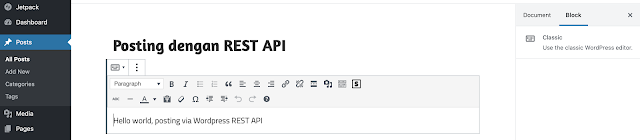
Selanjutnya kita cek Wordpress Dashboard (post dengan status draft).
Your post is published on https://batubelah.com/teknologi-bigdata/?p=220
Setelah berhasil upload artikel, kita coba upload gambar.
Your image is published on https://batubelah.com/teknologi-bigdata/wp-content/uploads/2020/03/HappyFace-3.jpg
221
Gambar berhasil di-upload dengan id=221
Lanjut, kita coba set gambar tersebut sebagai 'featured image'
The updated post is published on https://batubelah.com/teknologi-bigdata/?p=220
Post berhasil di-update plus 'featured image'

Selamat mencoba!
NB:
Berhubung code pada line update post = {'content' ...} tidak ditampilkan dengan lengkap, silakan gunakan screenshot berikut.

Environment: Jupyter Notebook Python 3.7
Pertama, Install Application Passwords plugin via dashboard Wordpress (Bisa diunduh dari https://wordpress.org/plugins/application-passwords/).
Setelah plugin Application Password di-install, buka profile, scroll kebawah hingga ketemu Application Password.
Buat password baru dengan memberi ketik nama dan klik Add New.

import requests
import json
import base64

url='https://batubelah.com/teknologi-bigdata/wp-json/wp/v2'#ganti domain name dengan domain name Wordpress anda
user='your_username' #username admin Wordpress
app_pass='xxxx xxxx xxxx xxxx xxxx xxxx' #space juga bagian dari password

data_string = user + ':' + app_pass

token = base64.b64encode(data_string.encode())

headers = {'Authorization': 'Basic ' + token.decode('utf-8'), 'user-agent': 'Mozilla/5.0 (Macintosh; Intel Mac OS X 10.9; rv:32.0) Gecko/20100101 Firefox/32.0'}

post = {'date': '2020-06-19T20:00:35',
        'title': 'Posting dengan REST API',
        'slug': 'posting-rest-api',
        'status': 'draft',
        'content': 'Hello world, posting via Wordpress REST API',
        'author': '1',
        'excerpt': 'REST API posting',
        'format': 'standard'
       }

r = requests.post(url + '/posts', headers=headers, json=post)
print(r)
Jika response-nya 201, berarti postingnya berhasil.
Selanjutnya kita cek Wordpress Dashboard (post dengan status draft).

print('Your post is published on ' + json.loads(r.content)['link']) #untuk menampilkan URI posting
Your post is published on https://batubelah.com/teknologi-bigdata/?p=220
Setelah berhasil upload artikel, kita coba upload gambar.
media = {'file': open('input/HappyFace.jpg', 'rb'), 'caption': 'HappyFace'}
image = requests.post(url + '/media', headers=headers, files=media)

print('Your image is published on ' + json.loads(image.content)['source_url'])
print(json.loads(image.content)['id'])
Your image is published on https://batubelah.com/teknologi-bigdata/wp-content/uploads/2020/03/HappyFace-3.jpg
221
Gambar berhasil di-upload dengan id=221
Lanjut, kita coba set gambar tersebut sebagai 'featured image'
imgsrc = json.loads(image.content)['source_url']
postid = json.loads(r.content)['id']
new_text = 'I put an image on a post and set it as featured image.'
updatedpost = {'content': new_text + ' ', 'featured_media': '221'}
update = requests.post(url + '/posts/' + str(postid), headers=headers, json=updatedpost)
print('The updated post is published on ' + json.loads(update.content)['link'])
', 'featured_media': '221'}
update = requests.post(url + '/posts/' + str(postid), headers=headers, json=updatedpost)
print('The updated post is published on ' + json.loads(update.content)['link'])
The updated post is published on https://batubelah.com/teknologi-bigdata/?p=220
Post berhasil di-update plus 'featured image'

Selamat mencoba!
NB:
Berhubung code pada line update post = {'content' ...} tidak ditampilkan dengan lengkap, silakan gunakan screenshot berikut.


Comments